


I found Asana: Work Management most useful when I stopped treating it as a simple to-do list and started using it as a shared map of work. It is a business app from Asana, Inc. that brings tasks, projects, goals, teams, and AI-assisted coordination into one workspace. That sounds broad, but the practical benefit is easier to understand: instead of keeping requests in chat, personal notes, and scattered documents, I can give each piece of work a clear place and a visible next step.
The app is free to install and is rated for Everyone, which makes it approachable for a mixed team. Its average rating is 3.9 from around 45 thousand ratings, and it has passed 5 million installs. Those figures suggest a well-established service, although they do not remove the learning curve. My first impression was that Asana rewards a little planning. If I simply add tasks without deciding how they belong together, the workspace becomes another crowded list. If I create a sensible structure first, it becomes much easier to follow.
What to expect when you open Asana
The mobile experience is designed around work that needs tracking rather than quick personal reminders. I would not choose it for a grocery list or a handful of casual notes. Its strength appears when several people need to know what is being done, who owns it, what comes next, and whether a larger project is moving forward.
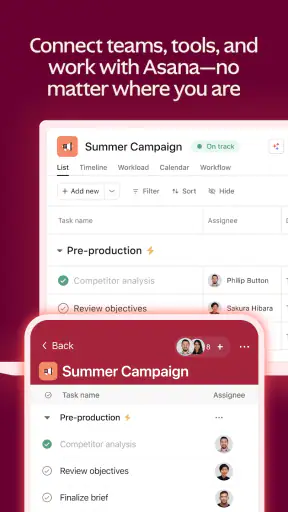
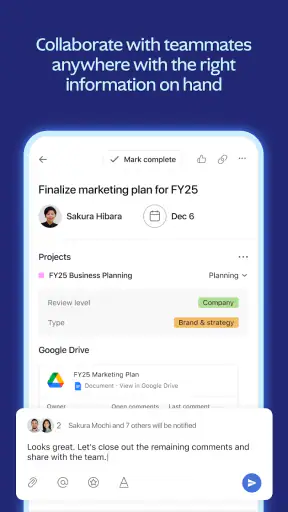
For example, imagine a small team preparing a product launch. One person may need to write the announcement, another may prepare images, and someone else may check the final wording. In Asana, these are not just separate reminders. They can sit inside a project, receive owners and due dates, and be reviewed as part of the same piece of work. That relationship is the reason to use it.
The most important habit is to turn vague intentions into visible next actions. “Prepare the launch” is too large to manage comfortably. “Draft the announcement,” “review the images,” and “approve the final copy” give the team something concrete to complete. Asana makes this distinction especially useful because tasks can carry context instead of forcing everyone to remember the details from a conversation.
The app also presents goals and broader progress, so it can connect everyday tasks with a larger outcome. I found that helpful for teams that regularly ask why a task matters. It is less useful if your work is entirely individual and changes too quickly to justify a project structure.
AI is part of the app’s current positioning, but I would not install Asana solely for that reason. The foundation remains the organization of tasks and projects. AI may help with coordination or handling work information, yet the quality of the result still depends on how clearly the underlying work is written. A poorly defined task does not become a good plan simply because an assistant is available.
Who will feel at home here
I would recommend Asana to a small business, a marketing group, a remote team, a student organization, or anyone coordinating work across several people. It is particularly suitable when responsibility is often unclear. Seeing an owner beside a task can prevent the familiar situation where everyone assumes somebody else is handling it.
It can also suit an individual managing several ongoing areas, such as freelance clients, content planning, and administrative work. In that case, I would keep the number of projects low and use clear task names. Creating a separate project for every minor activity makes the app feel heavier than it needs to be.
I would be more cautious about recommending it to someone who wants a very fast, private checklist. A lightweight reminder app may be better for that purpose. Asana asks you to think in terms of projects, ownership, and workflow. That extra structure is valuable for collaborative work, but it can feel like unnecessary administration for simple errands.
Setting up a useful workspace instead of an empty one
After installing the app, my advice is to begin with one real project rather than trying to reproduce your entire working life. Choose something with a clear finish line, such as preparing an event, publishing a small campaign, or completing a recurring team process. A defined project gives you a way to test the app without getting lost in configuration.
Start by naming the project after the outcome, not the general department. “Spring customer newsletter” is more useful than “Marketing,” because the name tells everyone what belongs there. Then add only the tasks needed for the first stage. You can expand the project later; you do not need to predict every detail before beginning.
For each task, write a verb and a result. “Check images” is weaker than “Approve the three images for the newsletter.” This small change reduces follow-up questions and makes completion easier to judge. I also prefer putting important background directly into the task rather than leaving the explanation in a separate chat thread. That gives the person doing the work a better chance of succeeding without asking for the same context again.
Assign ownership deliberately. A task without an owner may look organized while remaining nobody’s responsibility. At the same time, avoid assigning a group when one person is actually expected to act. If several people need to contribute, split the work into separate tasks or make the handoff clear. This is one of the less obvious ways to get more value from Asana: the app is not merely recording work, it is exposing where responsibility changes hands.
Due dates should describe a real commitment, not decorate the project. I found it helpful to use dates for decisions and handoffs, not only for the final deadline. If a designer needs approved wording before creating an image, the wording task should come first. That simple dependency in your thinking prevents a project from appearing on schedule while a crucial input is still missing.
On a phone, long task names and large projects can become tiring to scan. I recommend putting the essential information at the beginning of the task title and keeping the description for supporting detail. This makes the mobile view more useful when I am checking work between meetings or away from a desk.
The first meaningful success
My suggested first test is a small project with three to five tasks and one obvious handoff. For instance, create a “team meeting follow-up” project. Add a task for writing the decisions, another for assigning action items, and another for checking progress later. Give each action a person and a realistic date. Then complete the first task and watch how the remaining work becomes clearer.
This is more revealing than creating a dozen sample tasks. You will quickly learn whether the app’s organization matches the way you think. You will also see why a task should represent an outcome rather than a topic. “Meeting” is a topic; “Send the agreed action list” is something someone can finish.
For a team, the first success should include a handoff. Ask one person to complete a task and another to use the result. This tests whether the description contains enough context and whether the next person can find the work without a separate explanation. If the handoff fails, improve the task wording instead of adding more labels or projects.
A useful routine is to review the project at the end of the day and ask three questions: what is finished, what is blocked, and what is the next action? Asana is good at supporting this rhythm because the work remains visible after the conversation ends. The limitation is that the team must actually maintain it. No project tool can keep status accurate when everyone continues reporting progress somewhere else.
Where new users commonly get confused
The biggest source of confusion is the difference between a task and a project. A task is a piece of work that one person or a small group can act on. A project is the container that gives related tasks a shared purpose. If you use projects as broad labels and tasks as vague reminders, the structure loses its value.
Another common mistake is creating too many projects. I have seen people separate work by every client, month, meeting, and channel until finding anything requires more effort than doing it. A better approach is to create projects around outcomes or stable workflows, then use clear task names inside them. This keeps the app navigable without removing useful detail.
It is also easy to confuse activity with progress. Moving tasks around, changing labels, and adjusting dates can feel productive, but the real test is whether a deliverable has improved. I use the project view to support decisions, not to replace them. If a task has been postponed repeatedly, the answer may be to split it, clarify it, or remove it rather than assign another date.
Goals can create a similar misunderstanding. A goal is broader than a task, so it should not become a second list of every small action. I prefer connecting a goal to a small number of meaningful results and letting the project tasks provide the detail. That keeps the high-level view readable for someone who does not need to inspect every step.
Notifications and updates can also become noisy if every minor change receives equal attention. My practical solution is to write fewer, clearer updates and use task descriptions for stable information. A short progress note should explain what changed or what is blocked. Repeating “still working on it” does not help the person coordinating the project.
Finally, the mobile app can make a large workspace feel denser than it does on a bigger screen. I would not interpret that as a flaw in every situation, but it is a real trade-off. The phone is excellent for checking assignments, adding a task while an idea is fresh, and updating progress. For major restructuring, I prefer working with a broader view when available.
How it compares with simpler alternatives
Compared with a basic checklist app, Asana offers much stronger context. A checklist can tell me what I planned to do; Asana can show the project, owner, handoff, and broader objective connected to that action. The cost is more setup and more discipline. If I only need reminders for myself, the simpler tool will probably feel faster.
Compared with chat, Asana is better for durable work. Chat is excellent for quick decisions and discussion, but important tasks can disappear under newer messages. Putting the action in Asana gives it a stable location and makes responsibility easier to review. I still would not replace conversation entirely. The best arrangement is to discuss an issue where discussion is natural, then record the resulting action in the project.
Compared with a document or spreadsheet, Asana is more action-oriented. A document is often better for long-form writing, research, or a single reference that many people edit. A spreadsheet remains useful when calculations and structured data are central. Asana is the better fit when the main question is who does what next and how separate actions contribute to a shared result.
Compared with highly visual project tools, Asana may appeal more to people who want task clarity without turning every workflow into a board full of cards. That said, teams that depend heavily on visual pipelines or specialized planning may prefer a tool built around those particular methods. I would choose Asana for balanced work management, not for a narrowly specialized production system.
Practical workflows that reveal its value
One workflow I found especially effective is the recurring review. Create tasks for the steps that happen every week or month, then use the project as a checklist of the process rather than relying on memory. The important detail is to write the task so a different person could understand it. That makes the workflow more resilient when someone is absent.
Another useful approach is separating “waiting for” work from active work. If I am waiting for approval, I do not want that task to look identical to something I can complete immediately. Giving the task a clear status or placing it in the appropriate workflow area helps distinguish blocked progress from personal workload. This is a small organizational choice, but it makes team conversations much more honest.
For content work, I would use one task for the deliverable and smaller tasks for distinct approvals or inputs. I would avoid placing every sentence or minor edit into Asana. The app works best when tasks represent meaningful handoffs. Too much detail creates maintenance work and hides the decisions that actually matter.
For a manager, the strongest use may be the weekly overview rather than constant supervision. Reviewing overdue items, blocked tasks, and upcoming handoffs can reveal where support is needed. I would avoid using the app as a way to watch every movement. People need room to complete work, and an overloaded tracking system can encourage updates that look busy without improving results.
The app’s AI direction may be most helpful after the workspace has accumulated clear, organized information. I would treat it as an aid for finding patterns, summarizing work, or helping coordinate information, not as a substitute for defining priorities. The more precise the project structure, the more useful any assistance is likely to be.
Performance, access, and everyday fit
Asana: Work Management was released on February 27, 2013, and the current version is 26.33.2. On supported devices, the app feels like a mature companion to a broader work-management service rather than a small standalone checklist. The minimum operating system is iOS 11, so people using older Apple devices should check compatibility before planning a team rollout.
The free price makes it easy to try with a real project before asking everyone to change habits. That matters because the main question is not whether the interface looks appealing; it is whether your team will consistently place work there. I would start with a limited workflow, agree on what belongs in Asana, and review the results after the team has used it naturally.
Its Everyone age rating also makes it suitable for general workplace and educational settings from an audience-rating perspective. Still, suitability depends on the work itself. A team handling sensitive information should establish its own rules for what gets written into tasks and comments. The app can organize information, but good information hygiene remains the team’s responsibility.
Who should skip it and who should continue
You should probably skip Asana if your needs stop at private reminders, quick shopping lists, or a handful of recurring chores. The project model may feel like overhead, and you may spend more time arranging tasks than completing them. A simpler reminder tool would be a better match.
I would also hesitate if your team refuses to agree on ownership and status. In that situation, Asana may merely make the disorder more visible without solving it. The app works when people accept a shared habit: tasks need clear wording, owners need to update progress, and completed work needs to be closed.
On the other hand, continue with it if your team repeatedly loses requests in chat, misses handoffs, or cannot answer what is blocking a project. Those are precisely the problems its structure can address. Begin with one workflow, keep the project small, and expand only after the first process feels natural.
My final recommendation is to judge the app by the first meaningful result, not by how many features you can discover. Create one outcome-based project, add a few well-written tasks, assign the real owners, and complete a handoff. If that makes your next team conversation shorter and clearer, Asana is earning its place. If it only adds another place to update, choose something lighter or simplify the way you are using it.
For me, the lasting appeal is that it turns work from a collection of intentions into a visible sequence of responsibilities. It is not effortless, and it is not the best answer for every kind of list. But for teams that need shared direction without losing the details of everyday action, Asana: Work Management is a thoughtful, capable choice that becomes more useful as the workspace is kept clear.


